Published on
I’ve been doing a little bit of work on my site to make it nicer. For those that don’t know I use hugo for my static site generator so I just write out markdown files that then get compiled into html/css. I recently fixed some issues with stuff where I started h1 tags but then closed h2 tags (I know html I swear). I also fixed some of the metadata stuff so maybe it’ll help with SEO? I don’t really care that much, but it’s done. This probably messed with some people’s RSS readers because the individual posts got updated. Sorry about, that I try not to go back and update posts, but it happens sometimes.
I think sometime soon I’d like to make my site’s theme open source. Right now it’s still a little jank, but once I have it nice I’ll publish it and if anyone wants to use it they can.
Anyway, since I’ve been learning a little bit more about hugo I learned how to put images inline finally! I’ve always made my posts single files (I think they’re called leafs?). But I learned about page bundles, so I can include pictures really easily now. I also learned how to include actual source code, so this is how you include images lol
Where the stuff in brackets is the alt text, and then the stuff in parenthesis is the path to the image from where you’re at. This is also how I included the code lol:
{{< highlight markdown >}}

{{< /highlight >}}So I’m gonna show off some stuff about my server.

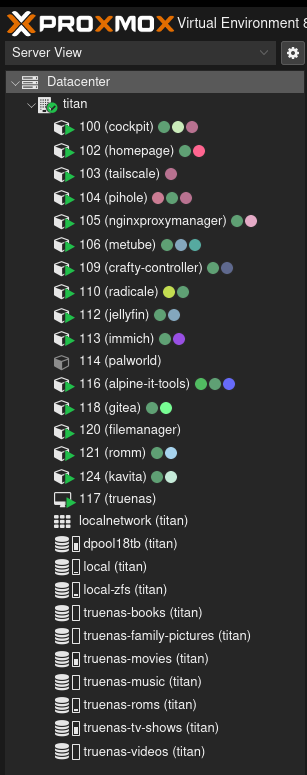
These are all the containers/services I’m currently running. I probably don’t need to but I feel like I should say: NONE of this is direct technical advice. I’m not saying you should do anything I’m doing, I’m just showing you the services I have hosted, where I may have learned about them, and certain quirks about them.
Most of these services can be installed in 1 command from the community-scripts repo. You run a command on your proxmox host and then it spins up either an lxc or a vm with a fresh install. Very nice project.
Cockpit
Cockpit is kind of legacy in my ecosystem at this point. It’s a front end that helps manage a linux install, like creating users and groups, password management, etc. It’s a nice system. I originally followed Aplard’s tutorial on setting up proxmox as a NAS. Essentially you have some drives (a dataset in a pool is probably the more accurate term, but I’ll say drive for this case) on proxmox, you setup a cockpit container and pass through those drives to the container, and cockpit handles your nfs/samba shares. Then for any other containers that need data on the drives, jellyfin for instance, you’d pass through the drives from the proxmox host to the container instead of mounting an nfs share in the lxc manually. So you can mount a share locally, move some files, and it shows up in the jellyfin container. This caused issues for me because of permissions. I understand general rwx, octal numbers, and groups, but when it comes to group ids and nfs permissions I kinda get lost. So it’s totally possible my new solution with truenas is overkill, but cockpit and I didn’t mesh super well.
Homepage
Homepage is a simple web app that hosts links to my bookmarks and services. It’s not totally up to date with all of my services and bookmarks, I have to login to the container and edit the files directly so it’s a little cumbersome. Not the best solution, but for the most part it’s set it and forget it. I don’t use this that much because I just start typing in the urls to my services (I have a reverse proxy you’ll see in a bit) or whatever site I’m going to and it pops up. But if you just connect to the ips directly then this could be very useful so you don’t have to remember them.
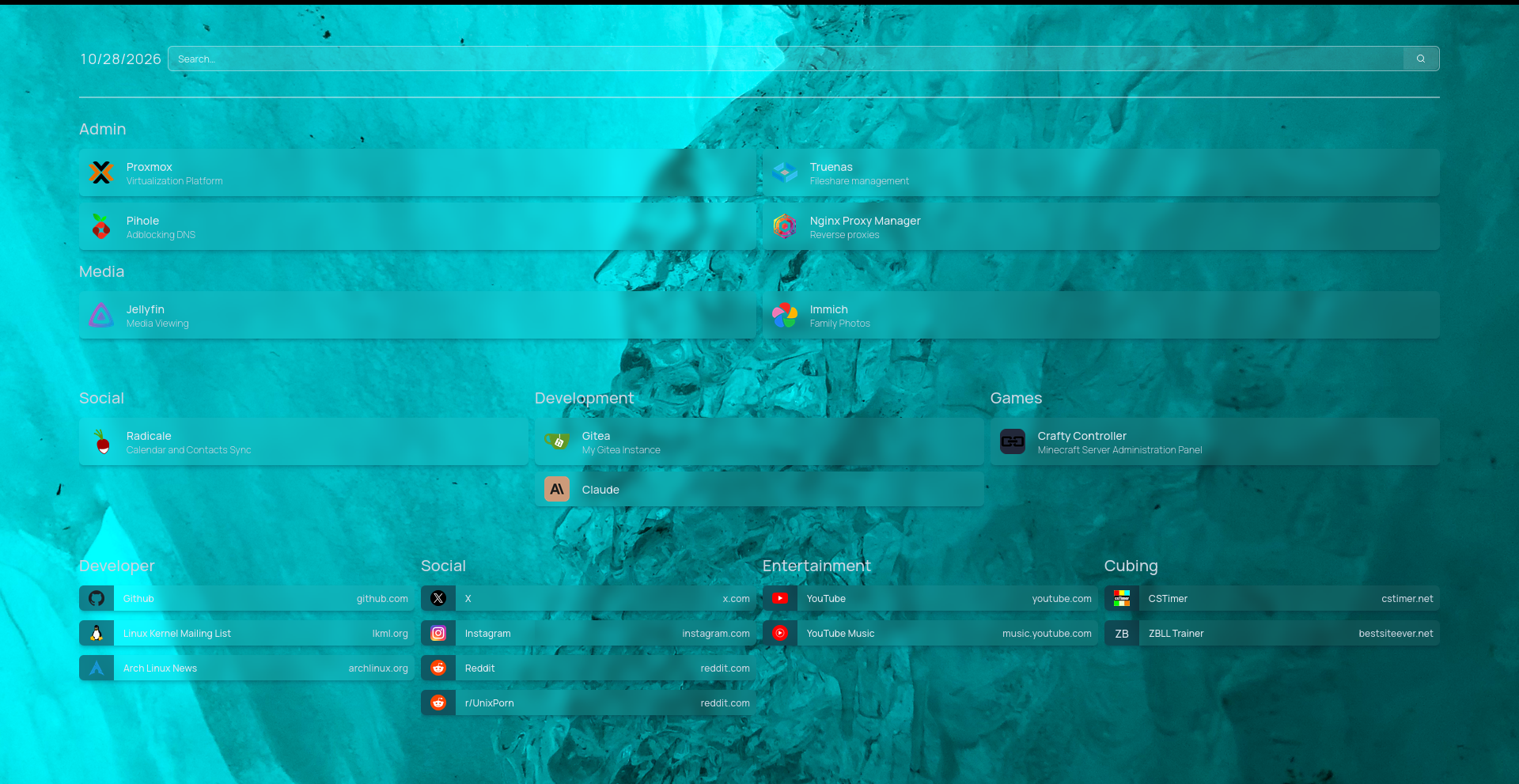
PS. The wallpaper I used for this is a picture that I took. I took it in 2022 when I went to Minneosta to visit my friend. It’s behind a frozen waterfall, it was super cool.
Tailscale
This is literally just a container acting as a subnet router for tailscale so I can access my services when I’m not home. I don’t port forward at all. I don’t think this is the best setup at all for this. I’ve been wanting to switch to headscale for everything so that way I can drop the $5/month plan, so I might do that soon.
Pihole
If you’re familiar with selfhosting but you don’t know what pi-hole is you’ve gotta be living under a rock lol. It basically blocks ads at the network level. Originally it was made to run on raspberry pi computers because it’s a pretty lightweight service.
You set your dns server to the pi-hole’s address and when your user does a DNS query for a site, pihole checks it’s blocklist and prevents ads from getting served. It won’t work for some ads because they’re served under the same domain name (e.g., Youtube), but it does alright.
There’s some other stuff it can do like handling custom dns records. It’s also not limited to just ad sites, you can block sites you don’t want all together (social media, adult content, etc).
You can actually point your router at it and make that the default dns server for your whole network. I don’t do this for 2 reasons. Some games that some people play in my house rely directly on some of these sites (probably not a good thing, but whatever), and in theory I think I can go and remove those sites from the blocklist so they would work, but that sounds annoying. I also don’t do it because if the pihole container/server goes down and you don’t know it, and it’s your router’s only dns provider then your internet goes down and it’s really hard to debug. Ask me how I know lol
Nginx Proxy Manager
Nginx proxy manager (NPM) is a front end for nginx the reverse proxy. This is just a nicer interface that let’s you manage nginx in a front end rather than editing config files. All of my traffic for my homelab goes through here. It’s all https encrypted too which is really REALLY NICE. I followed Wolfgang’s tutorial on how to set this up, I highly recommend it.
The only issue with it that I haven’t quite figured out is preventing people on my tailscale network from being able to access every service. I can’t easily disallow, per user, what urls they can go to. I don’t want my friends that play on my minecraft server to be able to access my truenas instance for example.
I used to have an issue on cloning via ssh from my git site for similar reasons. When you use the domain name, it gets routed to the NPM container so you’re trying to ssh into the NPM container instead of the gitea one. I got around this by disabling ssh in the NPM container, because I don’t ssh to it for any reason, and I setup a stream so it routes all traffic on port 22 to the right container. I used to have to either use the ip address, or I’d edit my ssh config so it knew where I wanted to go. Neither are terrible solutions, but this feels much more “production”.
Metube
Metube is a front end for yt-dlp. I use this to download Youtube shows and podcasts to my truenas shares and then watch them with jellyfin/kodi. Not much to say about this one, it mostly works. The setup to get a script to create an nfo file so it shows up correctly in jellyfin and kodi was a little challenging. It’s edited in the .env file instead of in the interface which is a little annoying.
Crafty Controller
Crafty Controller is a service that hosts modded and vanilla minecraft servers. I like older mod packs so getting some older versions of java to run was kinda tricky. I don’t have any servers running at the moment, but we’ve been talking about starting up a hardcore run.
Radicale
Radicale is a server that syncs my contacts, calendars, notes, tasks, journal entries and more between my phone and other devices. I don’t use this as much as I could/should. It’s pretty neat. I’ve recently started using the tasks functionality to keep up with stuff I want to do around the house/on my server.
I think the terminal application Calcurse can utilize it, but I don’t have that setup. I haven’t found a linux application that uses the notes/tasks in a way that I like either.
Jellyfin
Jellyfin is another one where if you haven’t heard about it you’re kind of under a rock. It’s a platform that hosts your movies, TV shows and more. I don’t like the comparison, but it’s kinda like your own self hosted netflix. I have my TV shows, movies, music and podcasts all hosted through it. It handles access via user accounts, scraping metadata from sites like TVDB, it handles transcoding, and it has a pretty rich plugin ecosystem. With tailscale I’m able to watch all of them from outside of my home network too. Very nice platform.
I recently upgraded to version 12 and that was kind of a pain. I think that’s mostly due to the issues I mentioned earlier where I was passing the disks to the container in a weird way and having to mess with permissions. I also tried keeping service for my family where I spun up a 2nd container, updated that one, and then switched to the 2nd container. But this didn’t matter/work because I was using the ip address from the first time I set it up, and I was using it everywhere so I had to call up my non-tech savvy family to change their setup.
I used to use plex and very seriously considered buying the lifetime pass before they bumped it up to $250. Now it’s like $700 or something. I’m perfectly happy with Jellyfin. I only recently started messing with plugins, which are cool.
There’s plugins to emulate some of what RomM does, which I might test out eventually to get everything into Jellyfin.
I used to have my books in here too, but then I switched to Kavita for the OPDS feed. But, I saw a plugin that gives you an OPDS feed, so I might switch back to exclusively jellyfin at some point.
Immich
Immich is basically a google photos replacement. It’s ok. I kinda don’t like how complicated picture hosting services are. It’s a more complex solution than what I give it credit for. I sorta just want to be able to point a program at a folder and say “Show these pictures exactly this way”, but that gets weird with authentication and compatibility across devices I think. You can kinda get that effect with “external” libraries in immich where you point it at a directory, but you can’t upload to these libraries I don’t think. I think what my brother/other people do is they’ll have backups of their pictures and have them in raw folders or however they prefer, and then they’ll use the immich upload to then sort them. I think there might also be a way to pull from a google photo dump, but i’m not sure about that.
This has some machine learning stuff in it for recognizing faces which is kinda nice. The community-scripts handles that by picking out your GPU and everything for you.
I don’t have too many people using it right now. I wanted this so that way I could have my friends upload their pictures from our trips and we’d have 1 place for them. I need to get on that lol
Palworld
This is a server I was hosting for my friends. I never really played it. It’s turned off right now because they’ve moved to a different game for the time being lol
Alpine IT Tools
These are a bunch of nice tools that I don’t use as much as I probably should. There’s hundreds of them probably. I think it’s just a static web page, I don’t think it connects to anything. I haven’t explored this much.
Gitea
Gitea is a self hosted git server. It’s nice. I don’t have many issues with it. I’ve only recently started doing more with it, and I’m the only one in my instance right now. I don’t think it’s quite open source anymore, but I could be wrong. I may eventually switch to Forgejo, but I’ll have to figure out the equivalent of their “actions”.
Setup with a reverse proxy like nginx is nice.
I think there’s some ways you can backup repos automatically from other services like github, gitlab or other self hosted ones like gogs.
File Manager
I spun this up to transfer files from my phone to my pc because my phone’s usb port is kinda busted. I should probably setup something more permanent like nextcloud, or figure out nfs shares on my phone or something, but this was fine.
RomM
Rom Manager is pretty sweet. It hosts a bunch of stuff related to your rom collections, and is sorta like jellyfin for roms. You can add users, platforms, sync saves, scrape metadata about the games (box art, manuals, etc), manage bios files, etc.
You can even play the games in the browser up until the ps1. I don’t use this feature, but it’s nice that it’s there.
My rom collection wasn’t huge, but I bought the AYN Thor and there’s supposed to be RomM integrations coming for a few different launchers on it. So it sounds like you’ll essentially have your own game store which is super badass. I have now upped my rom collection from around 100gb to 600gb (and then back down to like 400gb because of compression to chd files, also very badass). I’m gonna be retro gaming like crazy.
I have had some issues with setting up scrapers, and certain games not wanting to scan correctly. Screen Scraper in particular is weird because it’s a french site and the documentation is lacking a little bit. IGDB was a little easier, but you have to have a twitch account.
I don’t know if it’s a setting or something I need to change, but if a game isn’t found by a scraper I can’t seem to download it. I can see that there is a file there, so even though it isn’t scraped I would like to download it, but I haven’t found a way to get around that. Which sounds really stupid, and I’m hoping maybe I just haven’t found the button, or the setting to enable this, but that seems like a very big issue.
Kavita
Kavita is a service for hosting, reading and managing your e-books. I used to use calibre, which was just ok. Hosting your books has the same problem that hosting images have where I have a specific way I like my folders, but the program you’re using has their way of storing them. Kavita sorta adapts to what you have though.
I moved to kavita because it has a nicer interface and I think it was easier to setup at the time.
It mostly gets the job done. One thing I really like, that I’m sure is available in other apps like this, are OPDS feeds. They’re feeds that allow you to browse and download books straight to your e-reader such as a kindle. I have a kindle that I jailbroke and I have koreader on it, so instead of having to plug my kindle up and move files over manually I can just have my entire library at my finger tips. (Similar appeal to RomM lol)
A lot of my ebooks’ metadata isn’t totally correct, I need to go into kavita to fix some of it.
Truenas
Truenas is the new hotness in all of this. You’ll notice instead of it being a container, it’s a full VM.
This system is my new nas solutions. I haven’t even scratched the surface of what all it can do. Right now I basically have 2x12TB drives in my server that’s plugged into an HBA card that I pass through from the proxmox host to this vm. I do this so that way truenas can be the one to control the disks directly, which is important for getting disk health and controlling lower level kinds of details related to ZFS.
From within truenas I have some NFS shares setup for each of my kinds of media, and then I mount those in proxmox. Then in proxmox, for each of the containers that need them, I pass through the share as a mount point.
So for movies for example, I have a dataset in truenas with its own compression and snapshot settings for my movies, I have a share for that dataset where only my proxmox host (not any of the individual containers) can mount it. Then from in proxmox I mount that share. And for something like my Jellyfin container I have a mount point that’s mounted to /media/movies in the container, and then I just point Jellyfin at that location on the system and it can read the movies no problem.
Conclusion
It’s so late on Halloween, I almost forgot about this post. Almost lost my streak lol. This is a good overview of the services I run though. I might try to talk about them more next month. See you guys! Happy Halloween!